





Jan 30, 2026


In the rapidly evolving landscape of digital experience platforms, organizations are shifting away from rigid, monolithic systems toward modular, API-driven solutions. This article offers a comprehensive examination of how the Adobe Experience Manager (AEM) ecosystem has responded to this shift.
Key Takeaways:
-
The Shift to Composable: Why 70% of organizations are expected to adopt modular DXP technology by 2026.
-
AEM Architectural Deep Dive: A comparative analysis of Full Stack, Headless, and Hybrid approaches, including their specific pros, cons, and use cases.
-
AEM Headless Tools: An exploration of the Universal Editor for WYSIWYG headless authoring and the power of AEM GraphQL for efficient content delivery.
-
AEM Hybrid Options: An exploration of the offerings that AEM provides to support the implementation of a hybrid architecture.
The Shift From Traditional to Composable
Today, the traditional monolithic architecture approach, characterized by tightly integrated systems and applications offering a pre-packaged software stack, is no longer as sought after.
Instead, businesses have shifted towards a more scalable, modular architecture approach. This shift has given rise to more modern architectural paradigms such as "Headless" and "Composable."
Headless architecture, characterized by separating the frontend presentation layer from the backend content management and delivery systems, has emerged as a prominent trend in the industry. This approach offers enhanced flexibility and scalability in content delivery across various channels and devices.
By storing and managing content independently and retrieving it via APIs for dynamic frontend rendering, headless systems enable developers to exert greater control over user experiences, facilitating faster iteration and deployment of new features.
Furthermore, a composable architecture, which prioritizes modularity and flexibility, extends this trend by enabling organizations to build applications from reusable components. This approach promotes agility, interoperability, and adaptability, allowing businesses to quickly adjust to changing market demands.
According to Gartner, by 2026, at least 70% of organizations will adopt composable DXP technology, signaling a shift away from monolithic suites towards modular, API-driven solutions. However, with numerous options available, enterprises may be unsure which tool or product suite to select. This article provides a comprehensive guide to headless and composability for leading DXP vendors, showcasing how each approaches these new paradigms.
Composable and Headless in the Adobe Web Ecosystem
Adobe has incorporated elements of composable architecture into certain aspects of its Adobe Experience Cloud Ecosystem products. For example, Adobe Experience Platform (AEP) features a modular, flexible architecture that enables organizations to integrate and compose various services and components. Notably, Adobe Experience Manager (AEM) has evolved into a Hybrid CMS, allowing the implementation of software projects with Headful, Headless, or Hybrid architectures.
Below, we’ll explore how AEM follows these composable patterns, which tools are available, and how this can be used to implement a headless architecture in a software project.
AEM Architecture Solutions
Adobe Experience Manager (AEM) is a content management system (CMS) designed to store, manage, and deliver content, creating engaging online experiences. It provides various architectural options for implementing websites and applications, which we'll briefly outline below:
Full Stack
Also referred to as 'headful,' this traditional approach to implementing AEM projects involves using Sling and AEM components, with the backend delivering complete HTML to the client. Content delivery in full-stack CMS commonly occurs via internal content delivery APIs. Frontend functionality is typically specific to the full-stack CMS, and HTL is the technology AEM uses. This coupling of frontend technology with the content backend allows for a what-you-see-is-what-you-get (WYSIWYG) authoring experience.
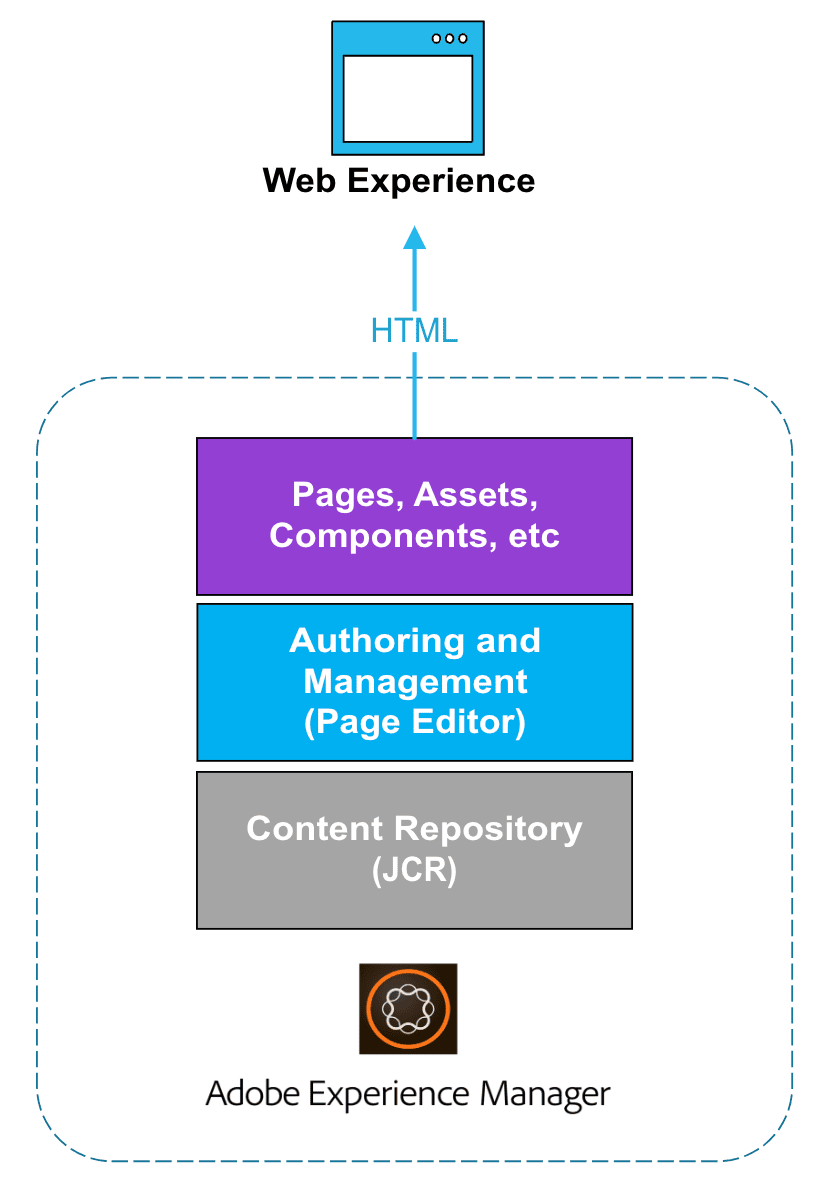
The primary focus of this document is exploring the headless options available; however, understanding the traditional AEM website creation architecture is also helpful in gaining a more comprehensive view of these options.
Advantages
-
Simplicity: Monolithic architectures are often simpler to understand and manage because all components are tightly integrated into a single application. This simplicity can make development, deployment, and maintenance easier.
-
Resource Efficiency: Monolithic architectures can be more resource-efficient in terms of hardware utilization. Since all components run within the same application process, there is less overhead than running multiple separate services.
-
Security: Monolithic architectures can sometimes be easier to secure because there are fewer entry points for potential attackers. Security measures can be applied at the application level, making access control easier to manage.
-
Affordability: Initially, a monolithic architecture reduces the total cost of ownership by employing a single architecture stack, leading to efficiencies in system maintenance and training.
-
Authoring experience: Integrating all components enhances the authoring experience. AEM provides the Page Editor, a powerful WYSIWYG (What You See Is What You Get) tool designed specifically for this purpose.
Disadvantages
-
Scalability Challenges: Monolithic architectures can be complex to scale horizontally because the entire application must be replicated rather than just specific components.
-
Limited Flexibility: Monolithic architectures are less flexible than other architectures because changes or updates to one part of the application often require redeployment of the entire monolith
-
Technology Stack Limitations: Monolithic architectures often restrict developers to a specific technology stack, as all application components are tightly integrated. A failure in one part of the monolith can also bring down the entire system.
-
Scaling Development Teams: In large projects, monolithic architectures can pose challenges for scaling development teams. With all developers working on the same codebase, coordination and collaboration become more difficult, potentially leading to bottlenecks and slower development cycles.
-
Vendor Lock-in: Adopting a monolithic architecture from a specific vendor can lead to vendor lock-in, making it challenging to migrate to alternative solutions in the future.
Headless
The headless approach with the frontend and backend decoupled contrasts with the traditional content management approach. Content is accessible via an API, which allows it to be displayed on any device. Developed and maintained independently, the front-end retrieves content from the headless backend using a Content Delivery API, typically in JSON format.
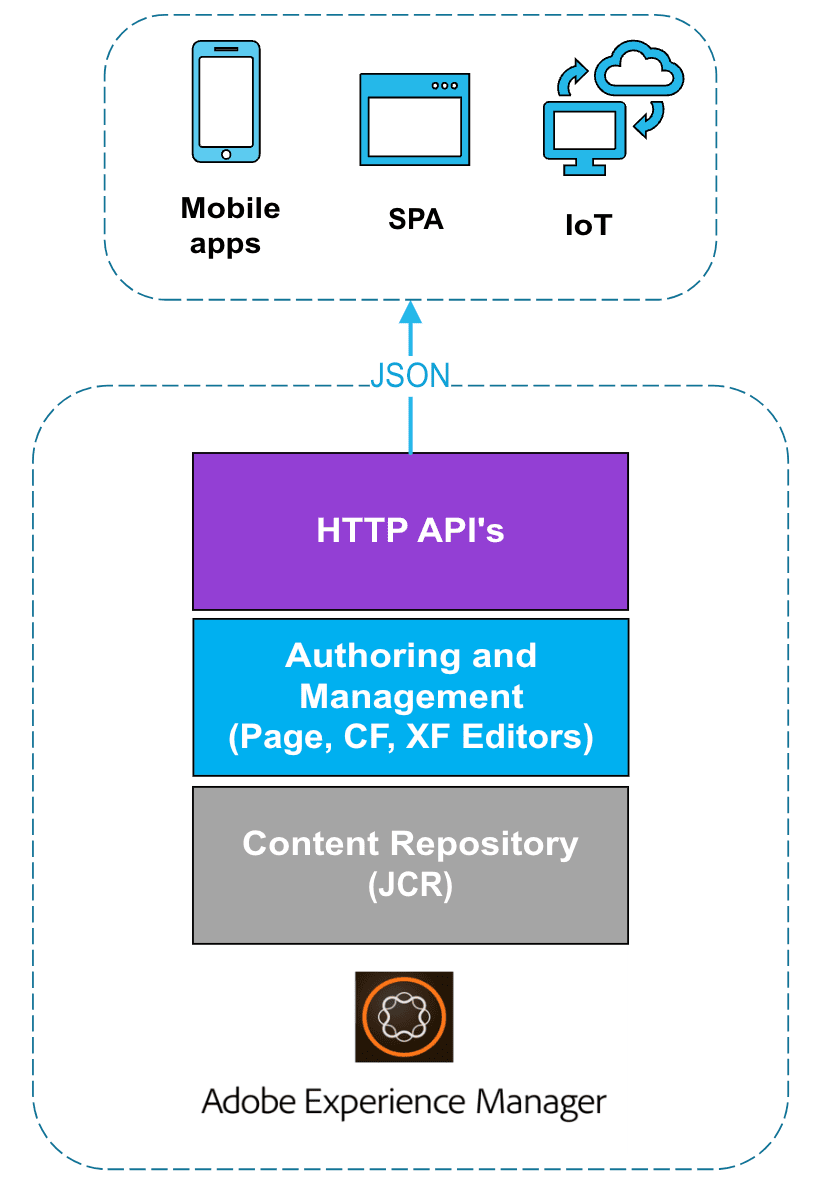
AEM provides tools to ensure content can be structured according to a model or schema. A key benefit of headless CMS technology is the ability to reuse content across multiple channels, each with its own client-side frontend implementations. This capability significantly streamlines the front-end development process. However, it also means that the front-end experience development process can become highly code—and IT-centric, with IT essentially taking ownership of the experience.
Advantages
-
Flexibility: Headless CMS architectures decouple the content management backend from the frontend presentation layer, enabling greater flexibility in how content is consumed and displayed across platforms and devices.
-
Scalability: Headless architectures are inherently scalable, enabling organizations to easily scale their content infrastructure as their needs evolve.
-
Content Reusability: Content created in a headless CMS can be easily reused across multiple channels and applications, enabling consistent, efficient content management.
-
Technology-Agnostic: Headless CMS architectures are technology agnostic, meaning developers can use the programming languages, frameworks, and tools that best suit their needs for building front-end applications.
-
Performance: By separating the backend content management system from the frontend presentation layer, headless architectures can often deliver improved performance, as content can be optimized and delivered more efficiently to end-users
-
Accelerated Deployment: By separating the front-end and back-end, teams can work on each part independently. This speeds up the process of introducing new features and updates.
-
Adaptability: Headless architectures enable content management strategies to adapt to new technologies and channels without requiring a complete overhaul of the content setup.
-
API-First Approach: Headless architectures typically follow an API-first approach, making it easier to integrate with other systems and services, such as e-commerce platforms, marketing automation tools, and third-party applications.
-
Cost of Ownership: Although adopting a headless CMS architecture could increase the total cost of ownership, it's important to consider situations where it's more cost-effective. By embracing a 'pay for what you need' approach, organizations can avoid investing in expansive Digital Experience Platforms (DXP) that offer numerous functionalities, many of which may not be utilized. Instead, they can opt for a more tailored solution that focuses only on the specific features required, potentially reducing expenses.
Disadvantages
-
Content Fragmentation: Managing content across multiple front-end applications can lead to fragmentation, where similar or related content is stored and managed separately. This can result in inconsistencies in branding, messaging, and user experience if not carefully coordinated and managed.
-
Limited Authoring Experience: Authoring capabilities are limited but sufficient for basic needs, relying on simple input editors; in AEM, this is supported through the Content Fragment editor.
-
Increased Development Complexity: Building and maintaining multiple front-end applications in a headless CMS architecture can introduce additional development complexities. Developers must ensure consistent data formatting and API integrations across various channels, which may require more time and effort than a single, monolithic CMS solution.
-
Complexity for Security, Access Control, and Personalization: Implementing security measures, access control policies, and personalization features in a headless CMS architecture can be more complex than traditional coupled architectures. Managing these aspects across multiple front-end applications may require additional effort and expertise, potentially increasing risks and vulnerabilities.
-
Learning Curve for Teams: Transitioning to a headless CMS architecture may require a learning curve for both development and content teams. Adapting to new workflows, tools, and best practices for managing content in a decoupled environment may take time and training, initially impacting productivity and efficiency. However, partnering with an experienced team proficient in building headless or composable architectures can help alleviate these challenges.
-
Slower Time to Market: In a headless CMS architecture, certain types of changes, such as title or image updates, often require developer involvement. This can lead to a slower time-to-market for new features and updates. The coordination between IT and marketing teams may lead to increased back-and-forth communication and implementation delays.
Hybrid
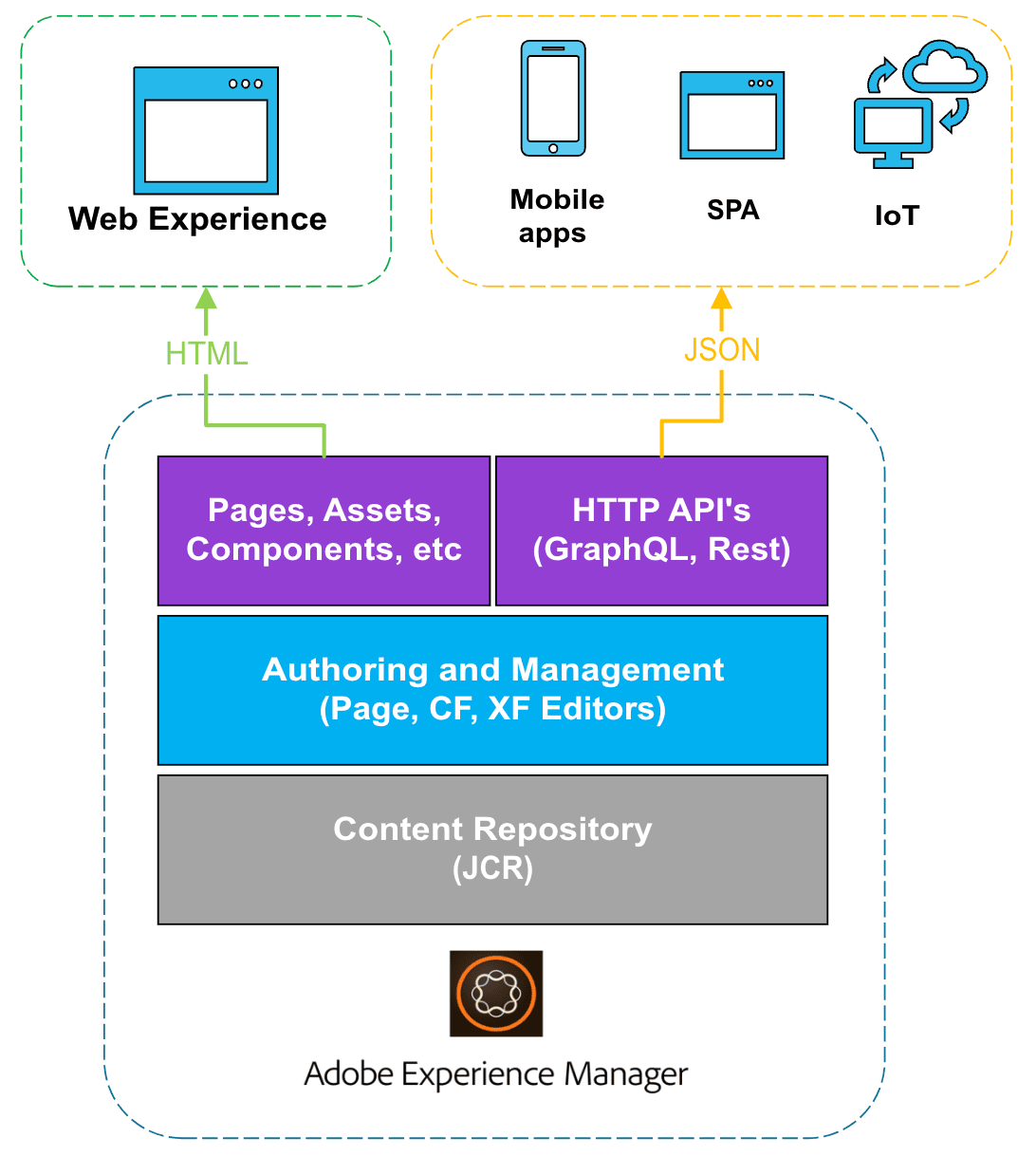
Adobe began calling it “hybrid,” a combination of the best of headless and headful approaches. With this Hybrid approach, developers can utilize modern tools to build websites and apps that function seamlessly on any device. At the same time, non-technical users can still easily create and manage content without needing IT help. This balance ensures that things run smoothly and allows everyone to contribute to creating great digital experiences. A key aspect of this approach is that content can be delivered through an API or traditional HTML.
Although AEM is still considered a hybrid CMS by definition, SPAs were initially designed to enable a hybrid architecture. With SPAs, you could create content in AEM and deliver it headlessly to a SPA, while still allowing that SPA to remain editable within AEM. The SPA Editor, intended to implement the hybrid architecture fully, was deprecated in 2025 in favor of the Universal Editor. This editor-as-a-service tool supports both headless and headful implementations.
Comparing Architectures
| Option | Description | Pros | Cons | Common Use Cases |
|---|---|---|---|---|
|
Full Stack Architecture |
The front and back ends are tightly coupled within a single system, enabling a WYSIWYG authoring experience. |
|
|
|
|
Hybrid Architecture |
The frontend and backend can be decoupled if required. By leveraging the Universal Editor or the SPA Editor (now deprecated), authors can retain a WYSIWYG authoring experience, thereby combining the key advantages of the other two architectural approaches. |
|
|
|
|
Headless Architecture |
Decouples the front and back end, with limited (if any) author experience. |
|
|
|
AEM Headless Tools
Adobe Experience Manager offers various tools and technologies to enable headless implementations by exposing its content. In this section, we will explore these options.
Universal Editor
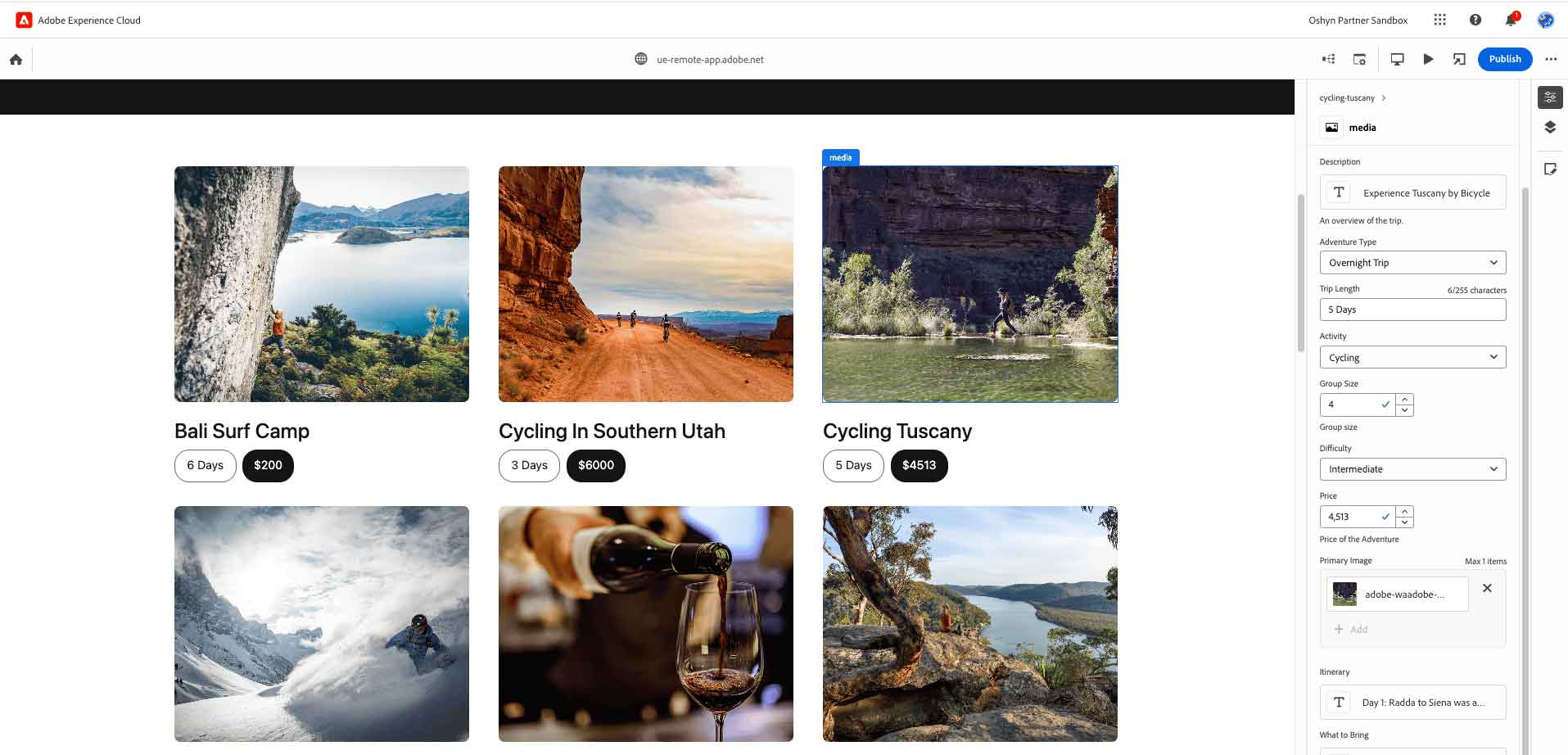
The Universal Editor is a modern visual authoring tool in Adobe Experience Manager (AEM) Sites that empowers marketing teams to create impactful web experiences. It supports WYSIWYG editing for both headless and headful implementations, allowing authors to edit content directly within the preview experience. This eliminates the need to navigate separate content sources while providing instant visual feedback, making it easier to manage content fragments, page components, and layouts in a single, unified interface.
Built for flexibility and ease of use, the Universal Editor requires minimal training and automatically enforces corporate brand guidelines, enabling scalable content production across an organization. Authors can compose, reorder, nest, and style content blocks, preview changes across devices, and reuse content across multiple channels. Integration with AEM tools such as the Sites Console and the Content Fragment Editor ensures a seamless authoring experience. At the same time, extension points allow developers to customize workflows, blocks, and other UI elements to meet specific business needs.
Developers benefit from the Universal Editor’s versatility, as it supports virtually any web framework (including React, Next.js, Astro, Angular, and more), server-side or client-side rendering, and a range of hosting models. Its design as a true editor-as-a-service enables enterprise-grade visual editing for headless architectures without imposing constraints on existing implementations.
Compared to the Content Fragment Editor, which is optimized for creating reusable content without layout concerns, the Universal Editor allows marketing teams to develop content tailored to a specific layout, enhancing the visitor experience and enabling more engaging, context-driven interactions.
How it Works
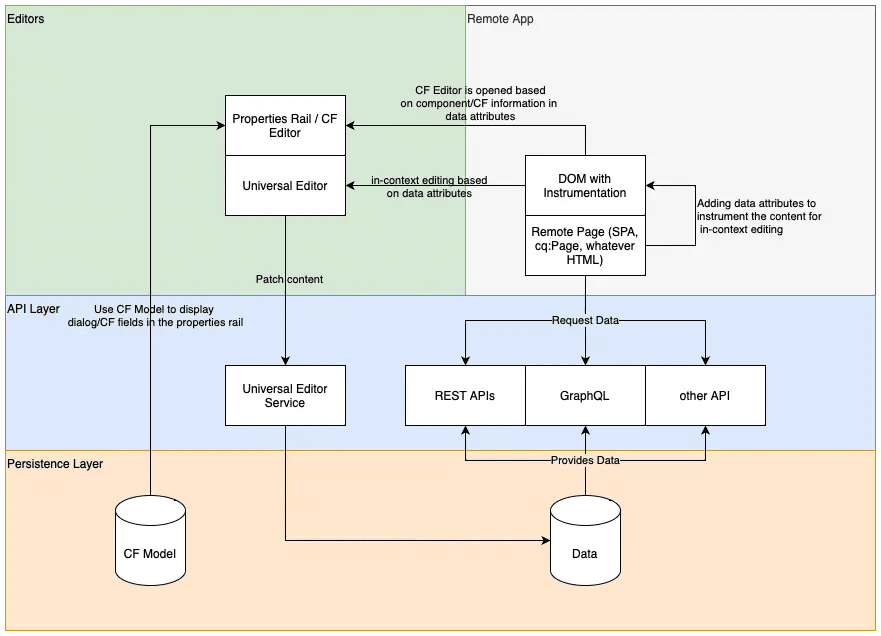
The Universal Editor uses four components: Editors, Remote App, API Layer, and Persistence Layer. To edit content directly on the webpage, an instrumented DOM is needed. This involves adding metadata to the DOM, allowing the Universal Editor to communicate with the remote application implementation. Authors can then edit content directly within the web experience. Additionally, if components with properties can't be edited directly, such as carousel rotation times or accordion tab configurations, a form-based editor is accessible in the side rail.
The Universal Editor emphasizes a minimal SDK, placing the responsibility of instrumentation on the remote app implementation.
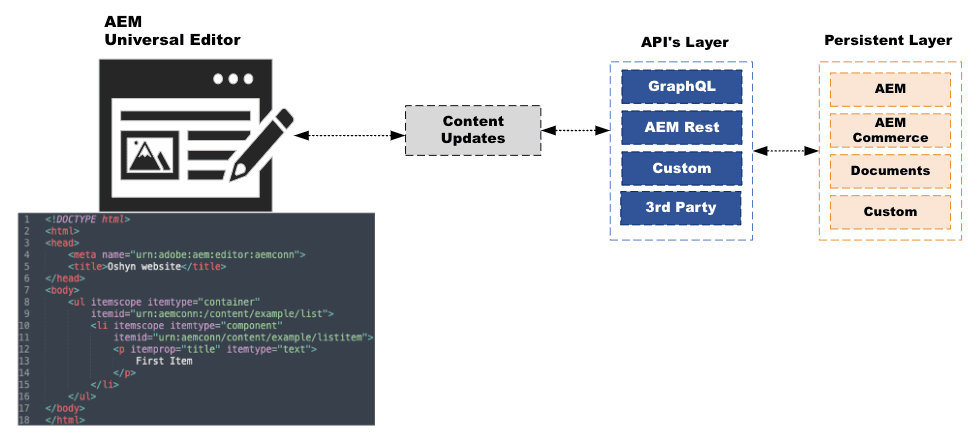
The API Layer is crucial in facilitating content data and persisting changes. Regardless of the source systems or consumption methods of content data, the API Layer ensures that required attributes are defined and provided for in-context editing. Furthermore, each editable data item is assigned a Uniform Resource Name (URN) identifier that directs the persistence process to the appropriate system and resource. The Persistence Layer handles content storage and supports various storage locations, including AEM, Magento, and others.
Finally, the content changes are dispatched to the Universal Editor Service, which operates on Adobe I/O Runtime. This service loads plugins from the Extension Registry based on provided URNs, facilitating communication with backend systems and ensuring a unified response to content modifications.
Advantages
-
Leverage Other AEM Sites Features: Supports translations, MSM, launches, content reuse, and more, enabling efficient management of multilingual and multi-site content.
-
Simplified Editing: Universal Editor provides an intuitive in-place editing interface, enabling you to edit content directly within the web experience.
-
Enhanced Flexibility: With minimal training, authors can easily manage content within the web page's context, ensuring accurate representation to visitors and improving overall efficiency.
-
Consistent Experience: The Universal Editor aims to provide a consistent editing experience across different content types, promoting coherence and uniformity in content management.
-
It's included at no extra cost if you use AEM as a Cloud Service.
Disadvantages
-
Limited Default Features: The UE ships with only essential features enabled by default, as allowing too many options can create unnecessary load and degrade the authoring experience.
-
Maturing Technology: Although the UE is generally available, it is still relatively new and continues to evolve to reach full maturity.
Common Use Case
While the Universal Editor is most naturally leveraged in headless scenarios, Adobe recommends it as the default authoring experience for both headless and headful implementations.
Content Fragments Model and Content Fragments
Content Fragments Model
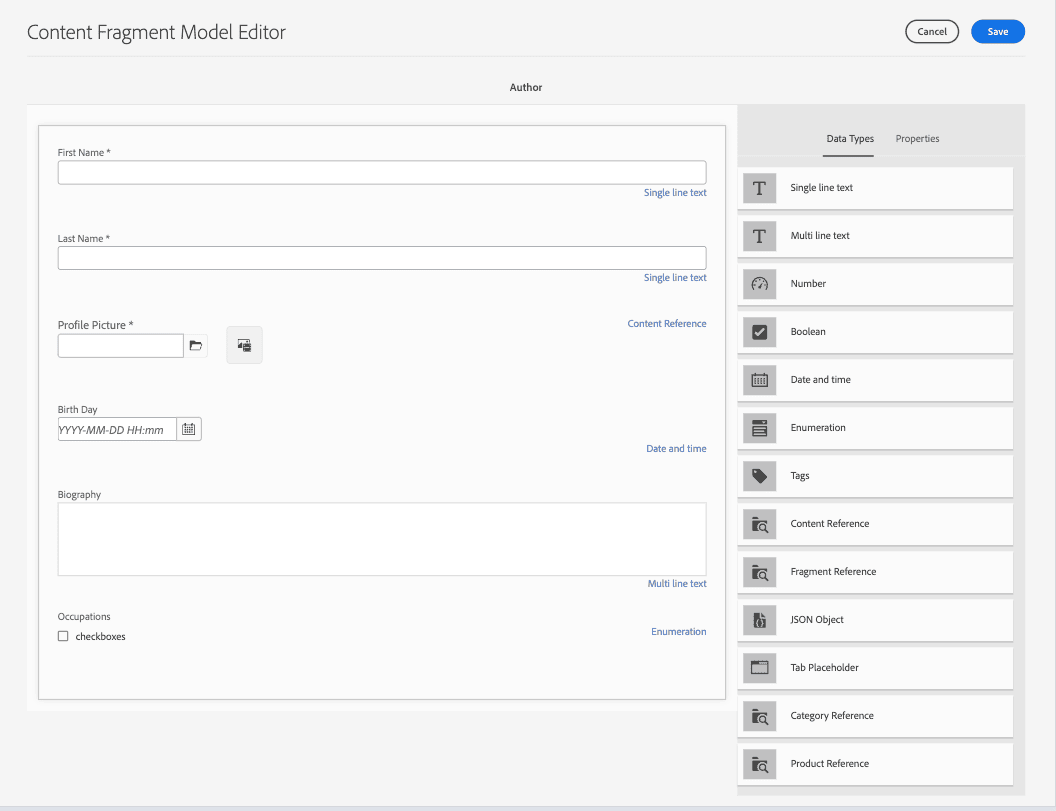
In AEM, a content fragment model (CFM) is a schema or data structure that organizes content fragments' content. It functions as a blueprint, defining the content type and structure of these fragments. Essentially, it's a template specifying the data each content fragment will contain and how it will be organized. This approach ensures consistent content presentation and simplifies content management, particularly when content must be flexible across devices and interfaces.
The Content Fragment Model offers a set of predefined data types for structuring data. These include:
-
Single line text
-
Multi-line text
-
Number
-
Boolean
-
Date and time
-
Enumeration (for checkboxes, radio buttons, or dropdowns)
-
Tags
-
Content References (for images or nested content)
-
Fragment Reference (linking other content fragments)
-
JSON Object (for additional information in JSON format)
-
Tab Placeholder (for organizing content types into sections)
These data types cover most user needs, but custom data types can be created in AEM if necessary. Each data type also includes various configurations, such as required fields, validation rules, and placeholders, providing flexibility and robustness to the content structure.
Content Fragments
A content fragment is a versatile container for content, independent of design or presentation considerations. It can hold unstructured data, such as text and images, or structured data elements defined by a data model. Unstructured content fragments are suitable for lengthy texts, such as articles, enabling authors to focus solely on writing while downstream channels handle layout and formatting. On the other hand, structured content fragments are ideal for business-specific data. Authors can utilize a text summarization feature to create tailored variations optimized for different channels.
Stored within Adobe Experience Manager (AEM) Assets, content fragments benefit from version control, approval workflows, and translation services. Although content fragments are a feature of Sites, they are stored as Assets, enabling seamless integration into content management processes. With AEM as a Cloud Service, content fragments facilitate the design, creation, curation, and publication of page-independent content. This flexibility makes them well-suited for use across multiple locations and channels, particularly in headless delivery scenarios.
Access to content fragments is facilitated through two consoles: Content Fragments and Assets. The new Content Fragment editor, designed primarily for headless content delivery, offers customization options via App Builder.
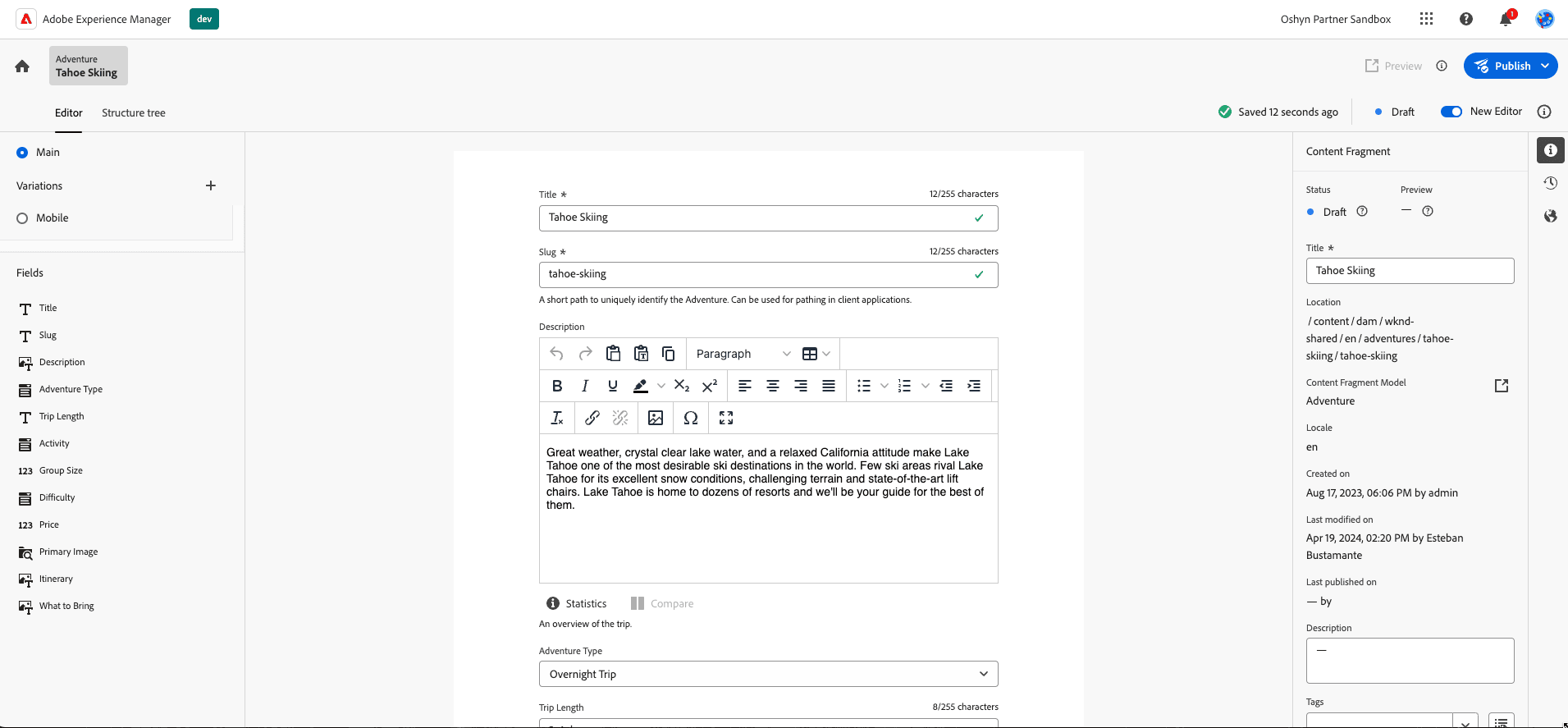
Content fragment structures vary from basic to complex or nested, depending on the requirements. Basic structures typically feature simple fields, such as single or multi-line text, which are suitable for straightforward content preparation. Complex structures combine multiple fields of various data types, catering to more intricate content needs. Nested structures utilize reference data types to organize content hierarchically, a technique often employed in headless delivery scenarios.
Content fragments can be utilized as HTML via the AEM Core component "Content Fragment," allowing for the direct delivery of default content into HTML paragraphs. Alternatively, the sling exporter exposes content fragment data as JSON objects without business-layer abstractions, presenting it in its raw form. For headless delivery, it's recommended that content fragments be exposed via GraphQL for efficient integration into various applications and platforms.
Common Use Cases
-
Leveraging GraphQL integration, content fragments enable seamless content delivery across platforms, empowering headless use cases.
-
With support for structured data entry and form-based content creation, content fragments ensure consistency and organization in data management processes.
-
Tailored for crafting long-form editorial content, content fragments accommodate multi-line elements, enabling comprehensive storytelling experiences.
-
Content fragments are suited for managing content independently of its delivery channels. They offer efficient handling and distribution capabilities across various platforms.
Experience Fragments vs Content Fragments
Sometimes, these two options can be confused or overlooked. In the chart below, we can see their similarities and differences.
| Content Fragment (CF) | Experience Fragment (XF) | |
|---|---|---|
|
Definition |
Reusable, design-agnostic content based on structured data models. |
A combination of AEM Components makes up content with its own design and layout, ready to be used independently. |
|
Core tenets |
|
|
|
Technical Details |
|
|
|
Variations |
|
|
|
Features |
|
|
|
Features |
|
|
|
Use |
|
|
AEM GraphQL APIs
GraphQL is a query language for APIs and a runtime for executing these queries, making it a popular choice for headless use cases. With GraphQL, client applications can create queries tailored to retrieve only the data they need. In this scenario, a server hosts all content and exposes it through GraphQL APIs. Client applications, such as mobile, desktop, or IoT devices, can formulate GraphQL queries to access the content needed for their apps, and the GraphQL API returns the requested data.
The rise in GraphQL's popularity can be attributed to several key factors:
-
Clients can craft queries to fetch specific properties they need, ensuring efficient data retrieval.
-
GraphQL enables fetching multiple resources in a single request, thereby minimizing HTTP requests and improving application speed and performance. For instance, a single query could retrieve unrelated items, such as persons and countries.
-
The GraphQL API is strongly typed, enforcing data model constraints and providing clear error messages and predictable results. Features like code completion further enhance query development.
-
GraphQL is designed to adapt to evolving data structures, seamlessly exposing additional fields or properties as they are added.
AEM provides a set of GraphQL APIs to expose data about content fragments. Although it's an abstraction of the original GraphQL language, it sufficiently covers most use cases. All content fragments within AEM are accessible via these APIs. Applications can query for lists of content fragments based on models or request data about individual fragments based on their location in AEM.
Properties available for GraphQL queries are derived from content fragment models. Any changes to these models are automatically reflected in the GraphQL API. As GraphQL is strongly typed, queries can be validated against the content fragment model's data schema in advance.
In addition to the AEM GraphQL API, Adobe has introduced a new editor, the GraphiQL IDE. This editor enables developers to swiftly test and refine queries while providing seamless access to documentation. It simplifies the learning process by giving clear insights into available methods.
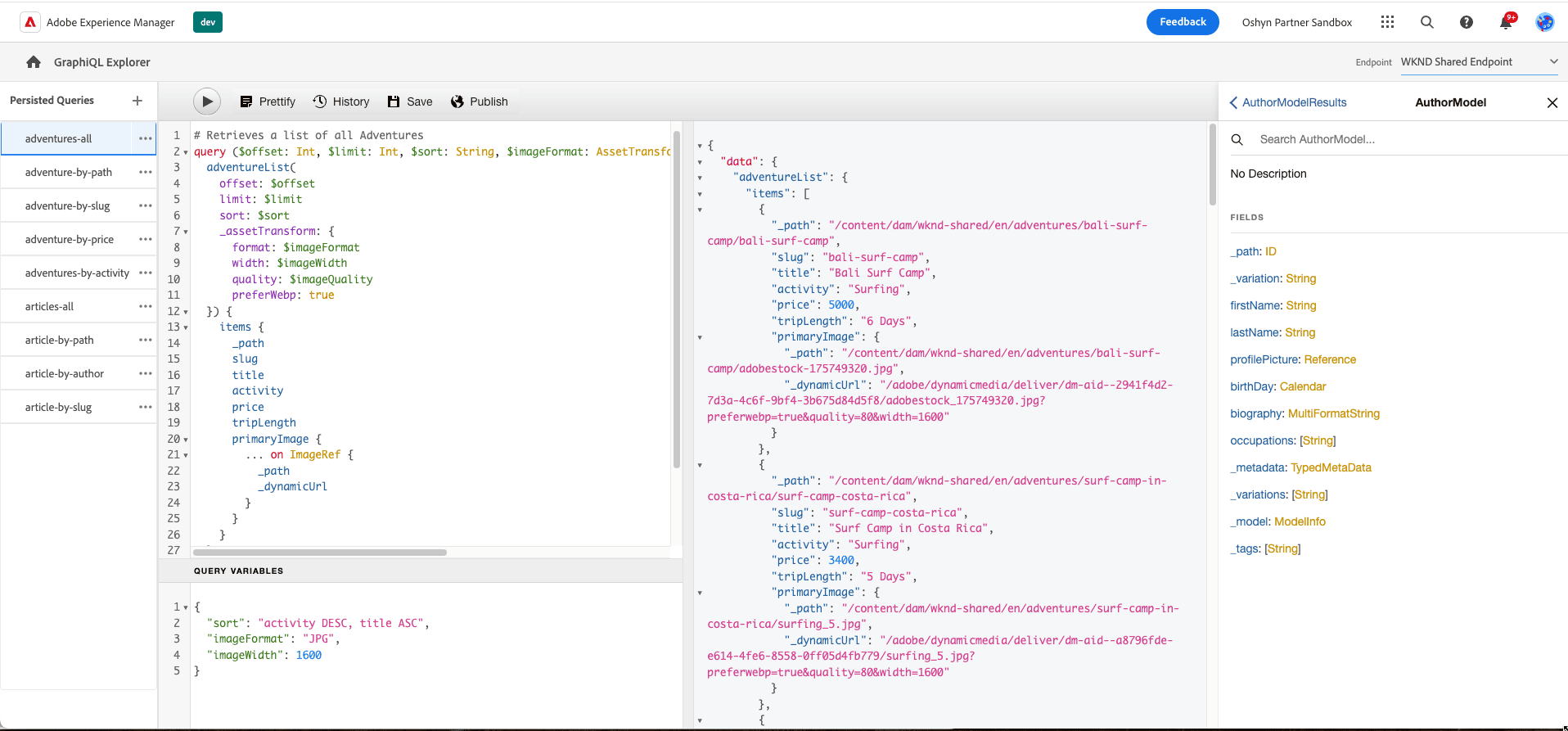
Persisted Queries
As mentioned earlier, GraphQL enables users to craft their own queries, which can quickly grow in size and complexity. To address this challenge, persistent queries were introduced. These persisted queries enable users to store the text of a GraphQL query on the server, specifically within AEM, rather than sending it with each request. Consequently, queries can be invoked using an ID rather than including the entire query in the request body.
Standard GraphQL queries are executed via POST requests, which pose issues because HTTP caches or CDNs cannot easily cache the responses. On the other hand, AEM persisted queries offer a solution by simplifying requests and enhancing security. By encapsulating queries on the server, AEM administrators retain complete control over them. Utilizing persisted queries is considered a best practice and highly recommended when working with the AEM GraphQL API.
Several methods exist for creating, updating, and executing persisted queries. These methods include using the GraphiQL IDE, cURL, or other tools such as Postman. However, the GraphiQL IDE is the preferred method for persisting queries.
Persisted Queries Best Practices
While Persisted Queries offer significant benefits for headless implementations, they are not a silver bullet. To ensure optimal functioning, adhering to certain best practices is essential. Here are some areas of key consideration:
-
Reduce the initial result set to keep it as small as possible: In AEM instances with a high number of Content Fragments sharing the same model, GraphQL list queries can become resource-intensive. This occurs because all fragments that share a model in the GraphQL query must be loaded into memory, consuming both time and memory. Here are some ways to mitigate this issue:
-
Hybrid Filtering: This combines JCR and AEM filtering. It applies a JCR filter to reduce the result set before loading it into memory for AEM filtering, improving efficiency. Implementing Hybrid Filtering in AEM requires updating existing Content Fragments.
-
Pagination: The response time for complex queries with large result sets can be improved by segmenting responses into chunks, a standard feature of GraphQL. GraphQL in AEM supports both limit/offset-based and cursor-based pagination.
-
Note that filtering, which reduces the number of items in the final result set, can only occur after loading the entire set into memory. Consequently, even small result sets may cause poor performance. However, the actual slowness stems from handling the initial set's size internally before filtering can be applied.
-
To enhance overall performance, persisted queries should be cached at both the Dispatcher and Content Delivery Network (CDN) layers. Manual configuration is required for the Dispatcher, and optimization can be achieved using time-to-live (TTL) headers. While AEM provides default TTL values per tier (author and publish), these can be customized at various levels: through the GraphiQL IDE, via cURL commands at the persisted query level, using Cloud Manager variables, or through OSGi configuration.
-
Persisted queries should only be consumed from Publish instances. While they can be utilized for testing or development purposes on Author instances, data should not be directly consumed by them.
-
Utilize a taxonomy for your content fragments to narrow the scope of the content to be processed. This is typically considered a best practice in AEM content management.
-
Apply JCR filtering on top-level fields, combined with logical operators such as AND. This efficiently narrows down results, particularly when dealing with nested fragments. Avoid using OR expressions with nested fragments, as they cannot be optimized for query performance.
-
Refrain from filtering on multi-line text fields like HTML, Markdown, plaintext, or JSON. These fields cannot be filtered via JCR queries, as their content is dynamically calculated. If filtering on a multiline text field is necessary, limit the initial result set size by combining additional filter expressions with the AND operator. Alternatively, consider restricting the scope by filtering on the _path field.
-
Avoid filtering on virtual fields, which are calculated during GraphQL query execution and are not compatible with JCR-based filtering. These fields are usually identified by the usage of “_” at the start of their name.
-
While nesting is useful for custom content structures, excessive levels can lead to longer processing times as GraphQL traverses nested fragments. To mitigate this, limit nesting to 5 or 6 levels, ensuring efficient querying and content management.
-
Optimize JSON response size and query processing time, and avoid outputting all formats (Rich Text, Simple Text, and Markdown) for multi-line text elements in AEM GraphQL. Outputting all formats triples the JSON output size, leading to longer computation times, especially with large result sets.
-
To ensure proper handling and consistency, modify Content Fragments and their resources exclusively through the AEM UI or APIs. To maintain integrity and prevent potential issues, avoid making direct modifications in JCR.
Content Services (Sling Model Exporter)
Content Services from Adobe introduced a Headless pattern to leverage AEM content for broader applications, marking one of Adobe's first initiatives towards a headless approach. They transcend traditional web page limitations, offering a generalized approach to describing and delivering content.
Technically, Content Services refers to the Apache Sling Model exporter framework, which is part of the Sling Models. Apache Sling is one of the foundational technologies in Adobe Experience Manager's technology stack.
The Sling Model Exporter was introduced in Apache Sling Models 1.3.0, providing an elegant way to export or serialize Sling Model objects into custom abstractions. This exporter automatically serializes Sling Model objects into JSON, enabling dual servicing of web requests. HTML responses are created using the traditional Sling Model request flow. At the same time, JSON renditions are exposed for consumption by web services or other channels, such as mobile apps, SPAs, and IoT devices.
This technology gained popularity when the AEM WCM Core components adopted it as a best practice, enabling them to expose their configurations and content as JSON out of the box. Another promotion of this technology was seen in the SPA editor, which relies on the Sling Model exporter to consume and build its technology.
How Does it Work?
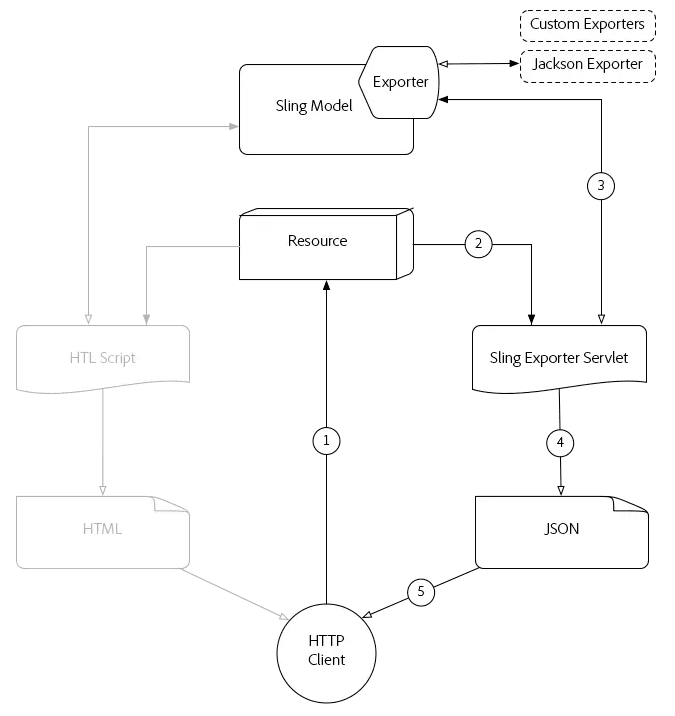
In the above image, we can see how this works:
-
An HTTP GET request is made for a resource in AEM, specifying the selector and extension registered with the Sling Model’s Exporter. For example,
HTTP GET /content/my-resource.model.json. -
Sling resolves the requested resource’s sling:resourceType, selector, and extension to a dynamically generated Sling Exporter Servlet, mapped to the Sling Model with Exporter.
-
The resolved Sling Exporter Servlet invokes the Sling Model Exporter against the Sling Model object, which is adapted from the request or resource determined by the Sling Model's adaptables.
-
The exporter serializes the Sling Model based on the Exporter Options and Exporter-specific Sling Model annotations, then returns the result to the Sling Exporter Servlet.
-
Finally, the Sling Exporter Servlet returns the JSON rendition of the Sling Model in the HTTP Response.
Common Use Cases
-
SPA implementations with SPA Editor (Deprecated). The Sling Model Exporter is the core of the SPA Editor, and it operates in a hybrid manner. Any custom component developed for a SPA implementation must implement the Component Exporter interface, which utilizes the Sling Model Exporter framework under the hood.
-
If content has already been built and needs to be reused across several channels, the Sling model exporter is usually the easiest way to expose it in JSON format. If the content is built following best practices, this should be easy to achieve.
-
Adding extra business rules to the exposed data. An advantage of the Sling Model Exporter is its native capability to refine data before exposure. Using plain Java objects (POJOs) within the Sling Model framework, users can manipulate and enhance data as needed. This flexibility enables selective exposure, data transformation, and augmentation, providing greater control over the final output.
AEM Delivery APIs
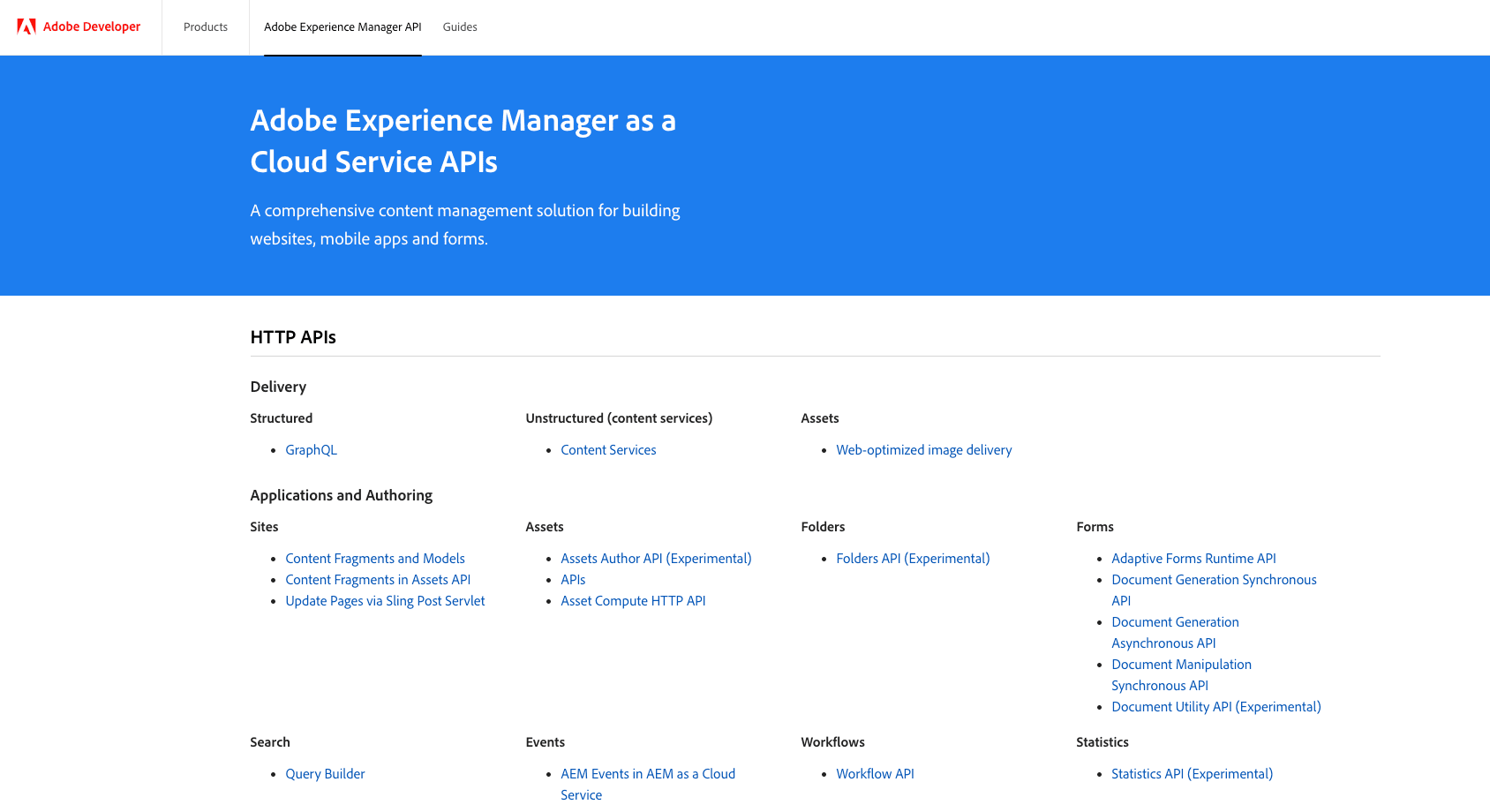
In addition to leveraging the Sling Model exporter, Adobe has shifted its focus to provide more out-of-the-box tools for headless implementation. With this in mind, Adobe has been and continues to work on APIs to expose content as JSON, following the OpenAI specification.
The provision of APIs isn’t a pattern unique to AEM. However, it is prevalent across various Adobe products within the Adobe Creative Cloud (including Photoshop and Illustrator), Adobe Experience Platform (AEP), Adobe Document Cloud (such as PDF services and Acrobat Sign), and Adobe Experience Cloud (including AEM, Target, and Analytics). All of these products offer APIs that enable headless interaction, enabling Adobe products to integrate more flexibly with third-party systems.
In this section, we will briefly discuss APIs that are relevant to Adobe Experience Manager.
Assets API
The Assets HTTP API provides CRUD operations for digital assets, metadata, renditions, and comments. It also supports structured content through Content Fragments. This API is accessible at /api/assets.json and supports Content Fragments.
The Assets HTTP API includes the following features:
-
Retrieve a folder listing
-
Create a folder
-
Update asset metadata
-
Create an asset rendition
-
Update an asset rendition
-
Create an asset comment
-
Copy a folder or asset
-
Move a folder or asset
-
Delete a folder, asset, or rendition
In addition to these functionalities, initially, the Assets API also supported limited interaction with Content Fragments, allowing the following actions:
-
Retrieve a content fragment by its path
-
Create a new content fragment
-
Update the content fragment
-
Update content fragment’s variations
-
Delete content fragments
Content Fragments API
Adobe introduced a new API in 2024 to enable comprehensive interaction with Content Fragments and their models. This API provides a range of examples, extensive documentation, and a playground for testing with real data directly from your server, requiring minimal configuration. Some of the operations supported by this new API include:
-
Fragment Management (CRUD operations and more upon CFs)
-
Fragment Variations (CRUD operations and more upon CF variations)
-
Fragment Versioning (CRUD operations and more upon CFs versions)
-
Model Management, for interacting with Content Fragment Models
-
Search, a Search API for Content Fragments based on various Search Criteria.
-
Tagging, for interacting with the Tags applied to a Content Fragment Model
-
References
-
Translations
-
Permission to get a list of permissions the user has over a list of Folders, Content Fragments, or Content Fragment Models
-
Launch workflows related to Content Fragments
-
Trigger content fragment and content fragment model events (Adobe Events) for other applications subscribed to them.
Common Use Cases
-
Integration with Third-Party Systems: REST APIs enable seamless integration with external systems, facilitating data exchange and communication between applications or services.
-
IoT (Internet of Things) Integration: REST APIs play a crucial role in IoT ecosystems, facilitating communication between IoT devices and central servers to transmit data, receive commands, and perform actions based on predefined rules.
-
Microservices Architecture: REST APIs are foundational in microservices-based architectures, enabling independent services to communicate with each other using standard HTTP methods, thereby promoting modularity, scalability, and flexibility in software design.
Edge Delivery Services
Edge Delivery Services (EDS) is the latest offering from Adobe, comprising a suite of composable services designed to enhance Adobe Experience Manager (AEM) capabilities and introduce a fresh approach to content creation. The primary goal of Edge Delivery Services is to:
-
Create sites with a perfect Lighthouse score.
-
Utilize a built-in experimentation framework that enables the rapid creation of tests.
-
Decoupling content sources increases authoring efficiency. In EDS, you can select the authoring experience that best suits your needs, including the Universal Editor, Document Authoring, or document-based authoring (e.g., Google or SharePoint).
Edge Delivery Services offers an effortless, intuitive way to create "headless" content. Users can utilize spreadsheets for a document-based authoring experience or select a dedicated template for the traditional AEM Authoring experience.
Spreadsheet in Document-based Authoring
When opting for document-based authoring, Edge Delivery Services extracts content from Google Docs or SharePoint spreadsheets, simplifying the creation of accessible JSON-formatted content. Configuration is straightforward: users create a spreadsheet and add a table with the data to be exposed. Once published, the data becomes accessible through a .json endpoint.
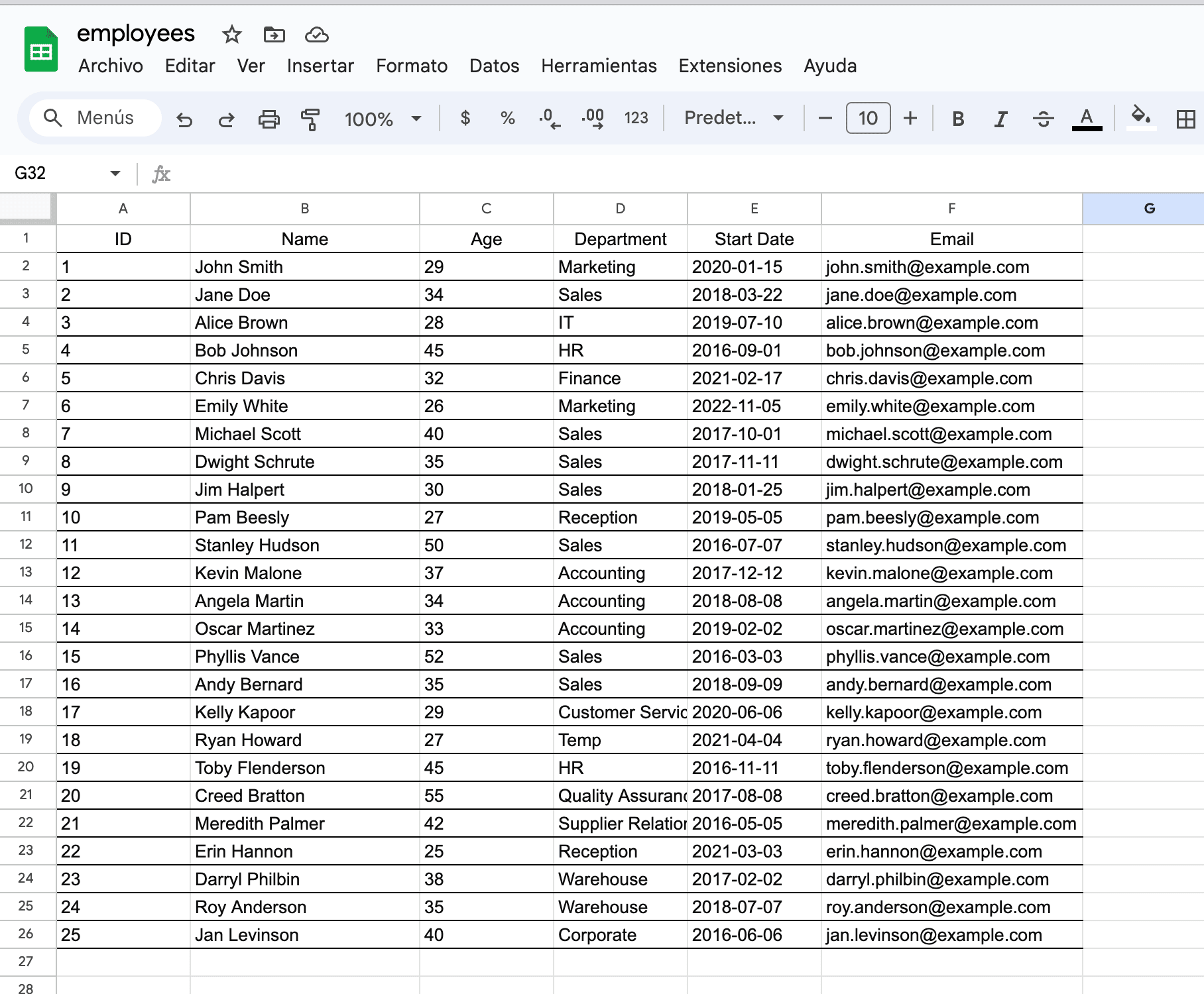
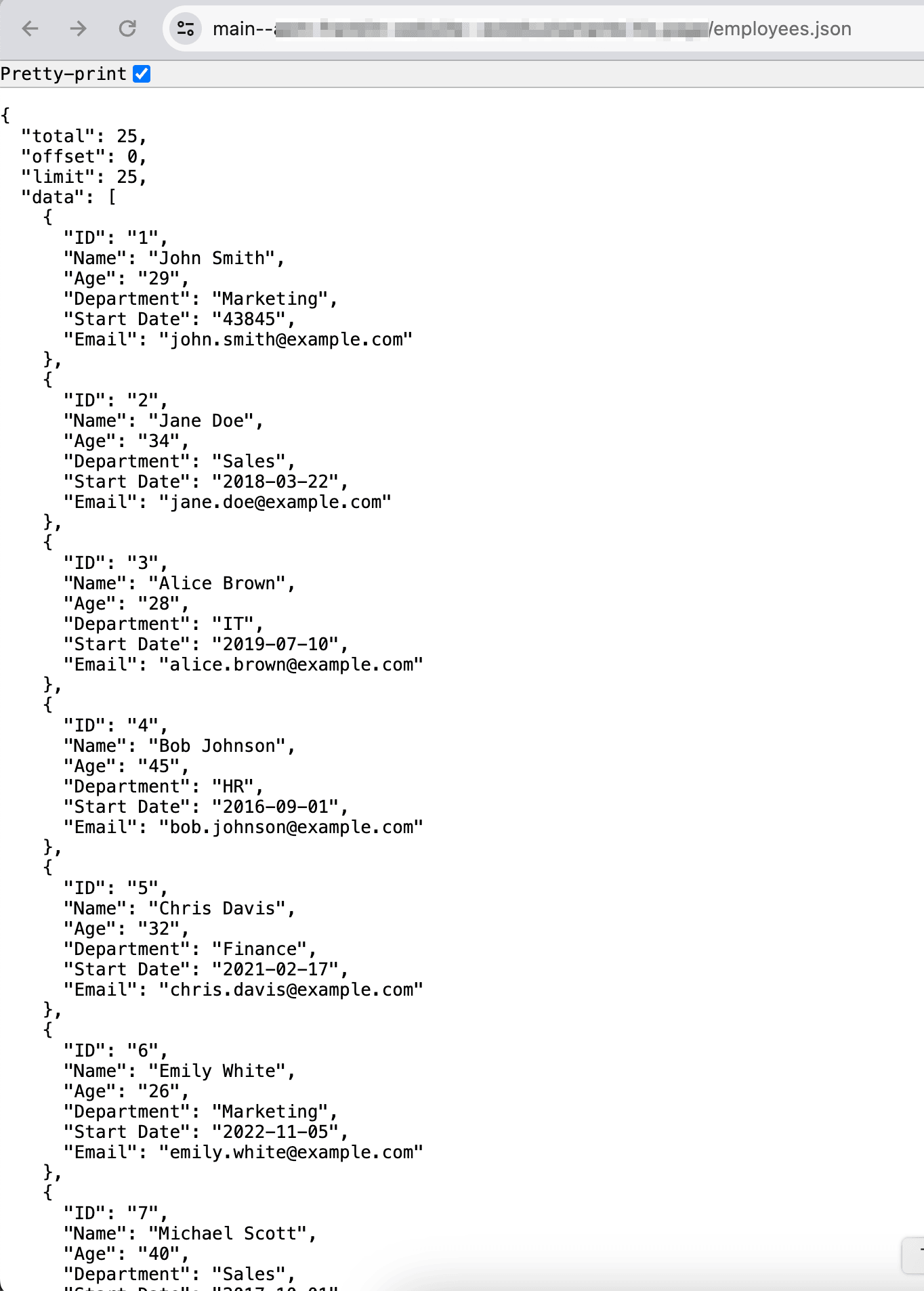
Spreadsheet Template in Traditional AEM Authoring
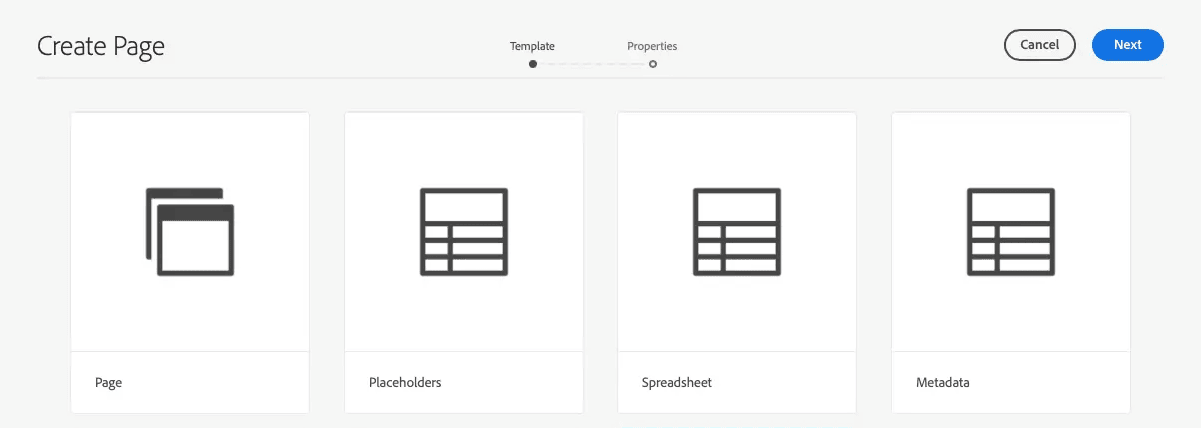
Similar to document-based authoring, the AEM Authoring experience exposes data in JSON format, presented in a table format. AEM includes a dedicated template, "Spreadsheet," for this purpose. This template mimics a spreadsheet, enabling authors to input raw data in table format. A mapping configuration must be established after creating and publishing the data in table format. This configuration specifies the endpoint name and source, facilitating access to the data in JSON format.
Advantages
-
An easy way to expose data as an endpoint or in a headless manner.
-
No learning curve is required due to the native table format used.
-
Pagination is implemented out of the box, as the JSON data includes the necessary parameters and information to support it.
-
The Document-based spreadsheet allows multiple sheets, enabling the quick creation of variations of the endpoint.
Disadvantages
-
It does not support native Arrays as cell values, so if used, they are delivered as strings.
Comparing Headless Options
| Option Name | Purpose | Pros | Cons |
|---|---|---|---|
|
Universal Editor |
Enable an authoring experience for inherently headless projects. |
|
|
|
AEM GraphQL |
Develop APIs to expose Content Fragments data in JSON format. |
|
|
|
Content Services |
Expose content from AEM components through the Sling framework in JSON format. |
|
|
|
AEM Delivery APIs |
Enable content manipulation from out-of-the-box AEM structures, such as Assets, Content Fragments, and Content Fragment Models. |
|
|
|
Edge Delivery Services (Spreadsheet) |
Expose content in JSON format derived from raw data presented in table format. |
|
|
AEM Hybrid Options
In this section, we will explore the offerings that AEM provides to support the implementation of a Hybrid architecture.
Disclaimer: The SPA Editor has been officially deprecated as of the 2025.01 release of AEM as a Cloud Service. As a result, Adobe no longer enhances or evolves the SPA Editor SDKs, limiting support to critical fixes and security updates only. While existing implementations may continue to operate, Adobe does not recommend the SPA Editor for new projects and instead advises adopting the Universal Editor or other modern authoring approaches to ensure long-term viability and access to ongoing innovations. However, since some existing solutions are still built on the SPA Editor, the following section may remain relevant for understanding or maintaining those implementations.
Single Page Applications with AEM SPA Editor (Deprecated)
A Single Page Application (SPA) is a web application that dynamically updates page content without requiring full page reloads. SPAs achieve this by loading content asynchronously and updating the page in response to user interactions, providing a smooth, responsive user experience similar to that of desktop applications.
Around 2021, Single Page Applications (SPAs) gained popularity, prompting more people to utilize SPAs with AEM's headless options. However, the architecture of an SPA powered by a "headless" CMS presents a new challenge. This approach often excludes marketers and authors from making presentation or layout decisions, resulting in increased time-to-market and total cost of ownership, as any changes require development support. In response to this issue, Adobe introduced the SPA Editor.
The SPA Editor offers a comprehensive solution for supporting SPAs within AEM. It provides in-context editing and authoring, offering a WYSIWYG editor familiar to AEM users. This editor has two versions, each with distinct features and capabilities that we will explore.
Single Page Applications (SPA)
SPA Editor v1, also known as SPA Editor or SPA Editor SDK, was launched in 2018. It is a tool provided by AEM that enables content creators to edit the content of Single-Page Applications (SPAs) within the AEM environment. The SPA Editor JS SDK is a collection of open-source JavaScript libraries that provide a framework for enabling editable content on SPA pages through the AEM SPA Editor. With the SPA Editor JS SDK, users can modify SPA content directly within AEM.
Let's outline some of the main characteristics of the SPA Editor:
-
The "head" or the application is embedded into AEM, operating in a coupled mode.
-
Only React and Angular are supported by Adobe for integration with the SPA Editor.
-
Additional front-end frameworks, such as Vue.js, can be incorporated, and the AEM SDK can be leveraged. Documentation is available to guide users through the integration process. However, it's important to note that custom Adobe does not support custom implementations.
-
The SPA Editor uses dedicated AEM JavaScript libraries to enable mapping JavaScript components with authoring capabilities.
-
With additional setup, server-side rendering is possible, though Adobe has not made this a starting point with the options available in the Maven Archetype.
Known Limitations
The AEM SPA Editor SDK was introduced with AEM 6.4 service pack 2. However, certain features from AEM Sites are not supported by the SPA Editor:
-
Target mode
-
ContextHub
-
Inline image editing
-
Edit configs (e.g., listeners)
-
Style System
-
Undo / Redo
-
Page diff and Time Warp
-
Features for rewriting HTML server-side, including a Link Checker, CDN rewriter service, and URL shortening, among others.
-
Developer mode
-
AEM Launches
Advantages
-
The content author can edit the app using AEM's familiar content authoring experience.
-
No additional infrastructure is required as everything is hosted on AEM.
-
Out-of-the-box components (core components) are included with the SDK.
Disadvantages
-
The content drives the application, so it must be written to match the author's content.
-
The application is responsible for routing, which can add complexity.
-
It is tightly coupled with AEM, requiring the SPA to be built in accordance with AEM specifications. This makes it almost impossible to integrate an existing SPA seamlessly into AEM.
-
Setting up SSR (Server-Side Rendering) can be challenging to configure.
Common Use Cases
Considering this technology is older, this section is primarily intended for educational purposes. It's highly recommended to explore either the Remote SPA or Universal Editor as the first option. However, you might still consider using this technology when:
-
You already have an existing SPA written in Angular or React.
-
Your SPA doesn't require extensive authoring.
-
You prefer not to manage a separate infrastructure for hosting the SPA externally.
-
SEO is not one of your priorities
Remote SPA
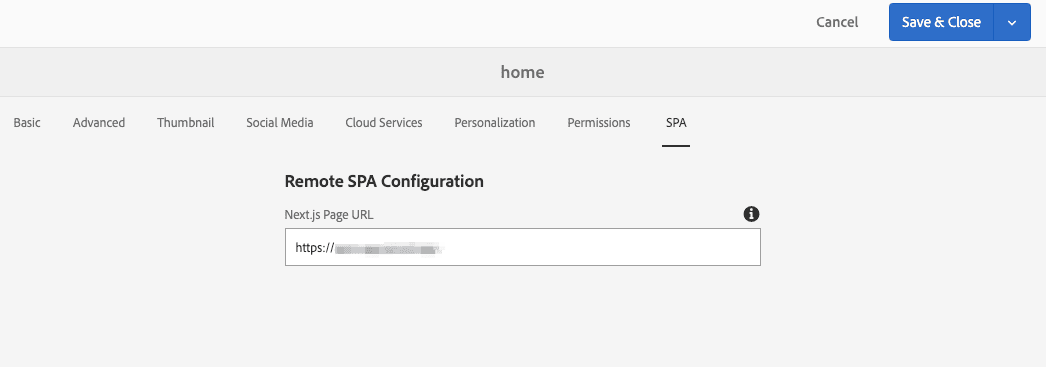
SPA Editor v2, commonly referred to as the Remote SPA Editor, addresses limitations and introduces enhancements in the previous version. Launched in 2021, it presents the following characteristics:
-
The application, or "head," is hosted externally to AEM.
-
It relies on the AEM SDK, with official Adobe support for React. Next.js has also been adopted as a common option, although it may not have full support from Adobe. However, Adobe offers some blueprints as references and starting points.
-
It supports dynamic routing, but each page needs to be explicitly configured to enable authoring.
-
The infrastructure for the head, where it resides, must be managed separately, which may result in additional costs and resource allocation.
-
It requires Server-Side Rendering, which is handled by the frontend module.
Server Side Rendering (SSR)
SSR is a technique used in web development to generate HTML for a webpage on the server and send it to the client's browser, rather than the more traditional client-side rendering, where the browser loads JavaScript files and dynamically renders the page content. With SSR, the server processes the request, retrieves the necessary data, and renders the HTML content, which is then sent to the client for display. This approach has several advantages, including improved performance, enhanced search engine optimization (SEO), and a better user experience, especially on devices with slower network connections or less powerful hardware.
SSR Hosting Options
Several options are available for hosting server-side rendering with the remote SPA editor. Adobe recommends using Adobe I/O Runtime, which provides a serverless environment for running JavaScript code.
Alternatively, developers can use any hosting platform that supports static site generation, including Vercel, Netlify, and AWS Amplify. Another option is to create a dedicated Node.js server. This can be achieved by developing an Express.js server and hosting it in the cloud, offering a more traditional approach to SSR hosting. Each option provides developers with flexibility and scalability in implementing SSR for their Remote SPA projects.
Advantages
-
SPA Remote allows SPAs to reside outside AEM's environment, facilitating modular development and simplified maintenance.
-
Core components are available in the SDK, providing ready-to-use building blocks for rapid development.
-
The development workflow is accelerated by concurrent task execution, thereby enhancing overall productivity.
-
Setting up SSR is typically straightforward since it's integrated into the front-end framework.
-
The clear separation of concerns between the front and back end means that not all team members need to be AEM experts; individuals proficient in React are often well-suited for the job. This flexibility can simplify the hiring process.
-
Dynamic routing can be implemented using Sling mappings and placeholder pages, offering greater flexibility in managing page navigation.
Disadvantages
-
The initial setup and learning curve can be significant, especially at the beginning stages.
-
SPAs require separate infrastructure, resulting in additional costs and increased complexity in resource management.
-
Developers have complete control over the SPA, dictating where and which pages need to be created for the application.
-
Defining editable sections within the SPA requires careful planning and implementation.
-
The application dictates the content structure, meaning authors must create pages based on the application's requirements rather than content-driven needs.
-
Although the archetype includes Webpack and React, upgrading frameworks and plugins may be difficult. For example, the default archetype does not include TypeScript.
Common Use Cases
Several factors should be considered when deciding whether to implement SPA Remote technology. Below are some of them:
-
SPA Remote is suitable for complex front-end integrations that require modern technology capabilities. Frameworks like Next.js and Svelte have gained popularity for their ability to streamline development processes and improve performance.
-
If your team is more proficient in frontend technologies such as React and Next.js than in Adobe Experience Manager, SPA Remote may be a preferred option.
-
SPA Remote can still provide a good, author-friendly experience with a WYSIWYG editor, albeit in a limited capacity.
-
Select SPA Remote for its scalability and ease of management, making it suitable for projects with evolving needs.
-
SPA Remote enables you to leverage out-of-the-box AEM functionalities, including MSM, Content Fragments, and live copies, providing flexibility in content management.
-
If you don't require a fully authorable site but need fixed areas for content authoring, SPA Remote can be a suitable choice.
Experience Fragments
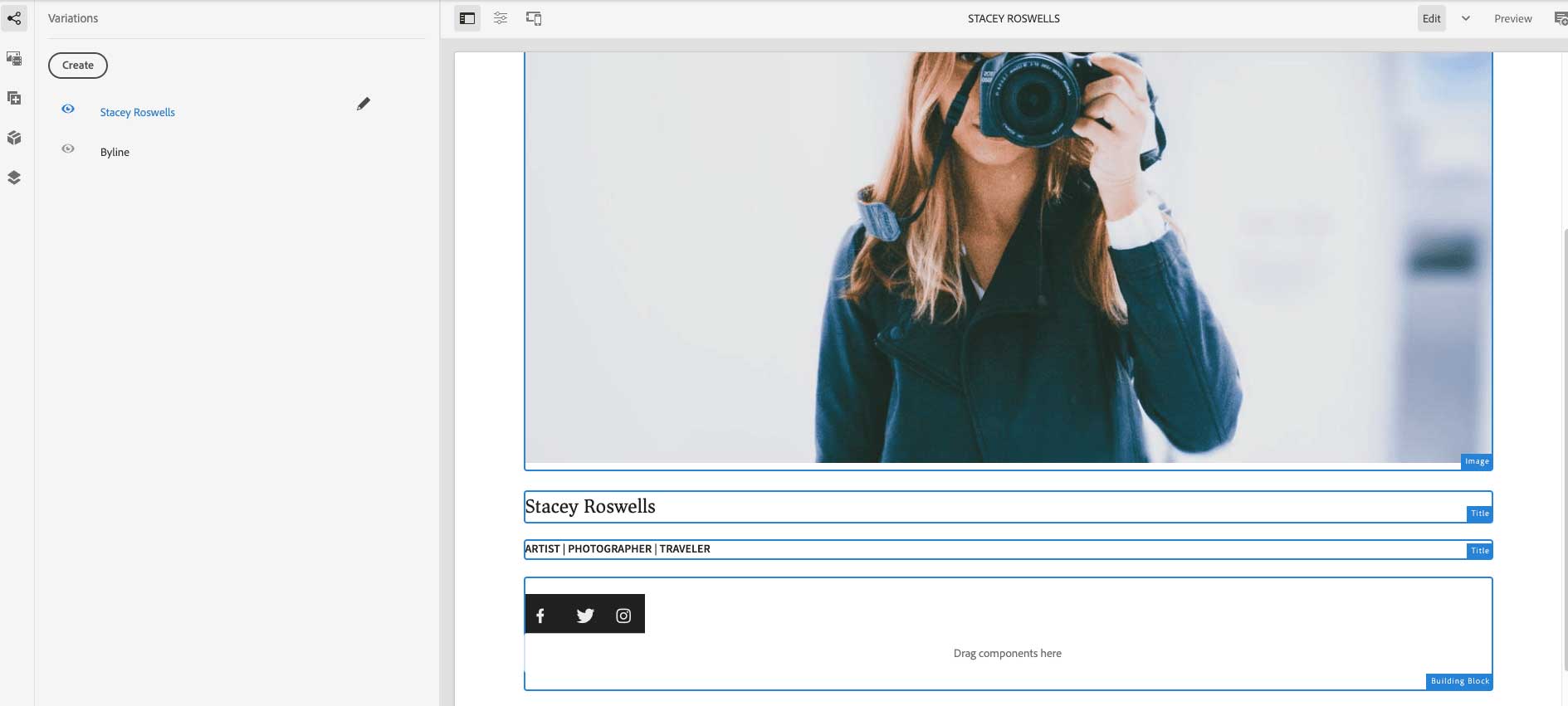
Experience fragments (XF) in Adobe Experience Manager (AEM) are special components that combine content with design and layout elements to create cohesive and engaging experiences. These fragments can be referenced within pages, allowing for flexible reuse across multiple contexts. Furthermore, experience fragments are based on editable templates that define their structure and components, serving as the foundation for creating the root page of the fragment. With a modular approach, experience fragments facilitate the creation of dynamic and customizable experiences by incorporating a diverse range of components within a paragraph system.
One of the key advantages of experience fragments is their scalability and reusability. They can be utilized across multiple pages within a website or application, streamlining content management and ensuring consistency across the digital ecosystem. Moreover, experience fragments support the creation of variations based on the root page template, enabling marketers to tailor content and components for different audiences or scenarios. These variations can share content and components, enhancing efficiency and reducing redundancy in content creation workflows.
Additionally, experience fragments offer granular control over content organization and presentation. They can be broken down into building blocks that can be reused across multiple variations of the fragment, promoting consistency and efficiency in content management. This modular approach enables marketers to assemble and customize experiences quickly and efficiently, empowering them to deliver compelling and personalized content to their target audience across various channels and touchpoints.
Delivery Mechanisms for Experience Fragments
Experience fragments can be delivered in different ways to fit into various platforms:
-
They can be directly added to Adobe Experience Manager features, such as Sites or Screens, and displayed as regular web content.
-
Special links can also be used to send them to apps outside of Adobe Experience Manager, where they will appear as web content (HTML).
-
Using their tools, you can share them on social media platforms like Facebook or X.
-
They can be exposed as JSON information for third-party services.
-
They can also be sent to Adobe Target, which helps personalize content for specific groups of people on websites or in apps (HTML/JSON).
These methods make it easy to share experience fragments wherever needed, keeping your message consistent across various online platforms.
Common Use Cases
Experience fragments in Adobe Experience Manager (AEM) offer a versatile solution for a variety of use cases, each tailored to specific needs and scenarios:
-
Content Reusability and Management: Experience fragments are ideal for reusing experiences across different pages or touchpoints within a website or application. This capability streamlines content management, saving authors time and effort who would otherwise need to manually copy and paste content components.
-
Third-party Content Syndication: For organizations that utilize AEM as a content delivery platform for third-party websites or applications, experience fragments facilitate seamless content integration across various platforms. This ensures consistency in messaging and branding, enhancing the overall user experience.
-
Variations and Contextualization: Experience fragments excel in scenarios where variations or renditions of content are needed for specific channels or contexts. Marketers can leverage experience fragments to create channel-specific variations or group related experiences, such as different versions of a campaign across digital channels.
-
Omnichannel Commerce: Businesses implementing omnichannel commerce strategies benefit from using experience fragments to turn touchpoints into transactions. By delivering cohesive and personalized experiences across multiple channels, experience fragments enhance the overall customer journey and drive conversions effectively.
Wrapping Up
Adobe Experience Manager (AEM) offers multiple implementation approaches: Traditional/Headful, Headless, and Hybrid. Understanding the tools tailored to each approach can empower users to navigate and execute their projects effectively within the AEM ecosystem.
However, the choice between these design patterns hinges on multiple factors, including project needs, team familiarity with the tools, time constraints, and alignment with overarching business objectives.
Ultimately, the decision requires carefully evaluating how the chosen approach aligns with project goals and maximizes the potential for success.
Oshyn Can Help
If you need help navigating these implementation options within the Adobe web ecosystem, our team is ready to assist. Simply schedule a time or contact us to arrange a conversation with one of our expert consultants.
-
BLOG

 Esteban Bustamante
How to Use AI Skills to Build Faster, Cleaner EDS Components
-
BLOG
 Esteban Bustamante
How to use Agentic AI in AEM Development to Supercharge Your Website Redesign
-
BLOG

 Oshyn
Oshyn
AEM as a Cloud Service (AEMaaCS)
The Benefits of AEM in the Cloud
-
BLOG
 Oshyn
Oshyn
Adobe Champion Spotlight
Q&A with Oshyn’s Esteban Bustamante
This site is protected by reCAPTCHA and the Google Privacy Policy and Terms of Service apply.